Choosing a Document Store
Whether you are developing a chatbot, a RAG system, or an image captioner, at some point, it's likely for your AI application to compare the input it gets with the information it already knows.
Haystack currently has integrations with seven categories of Document Stores:
- Vector Databases — purpose-built for embedding search and semantic retrieval
- Search Engines — full-text search engines extended with vector (kNN) capabilities
- Relational Databases — SQL databases with vector search via plugins or extensions
- Document / NoSQL Databases — flexible document stores with vector search added on top
- In-memory Key-Value Stores — ultra-low-latency stores with HNSW vector search
- Vector Index Libraries — lightweight in-process vector similarity search, no external service
- Multi-model Databases — single engine supporting graph, document, and vector data models
Here is an overview of all the integrations currently available, grouped by category:
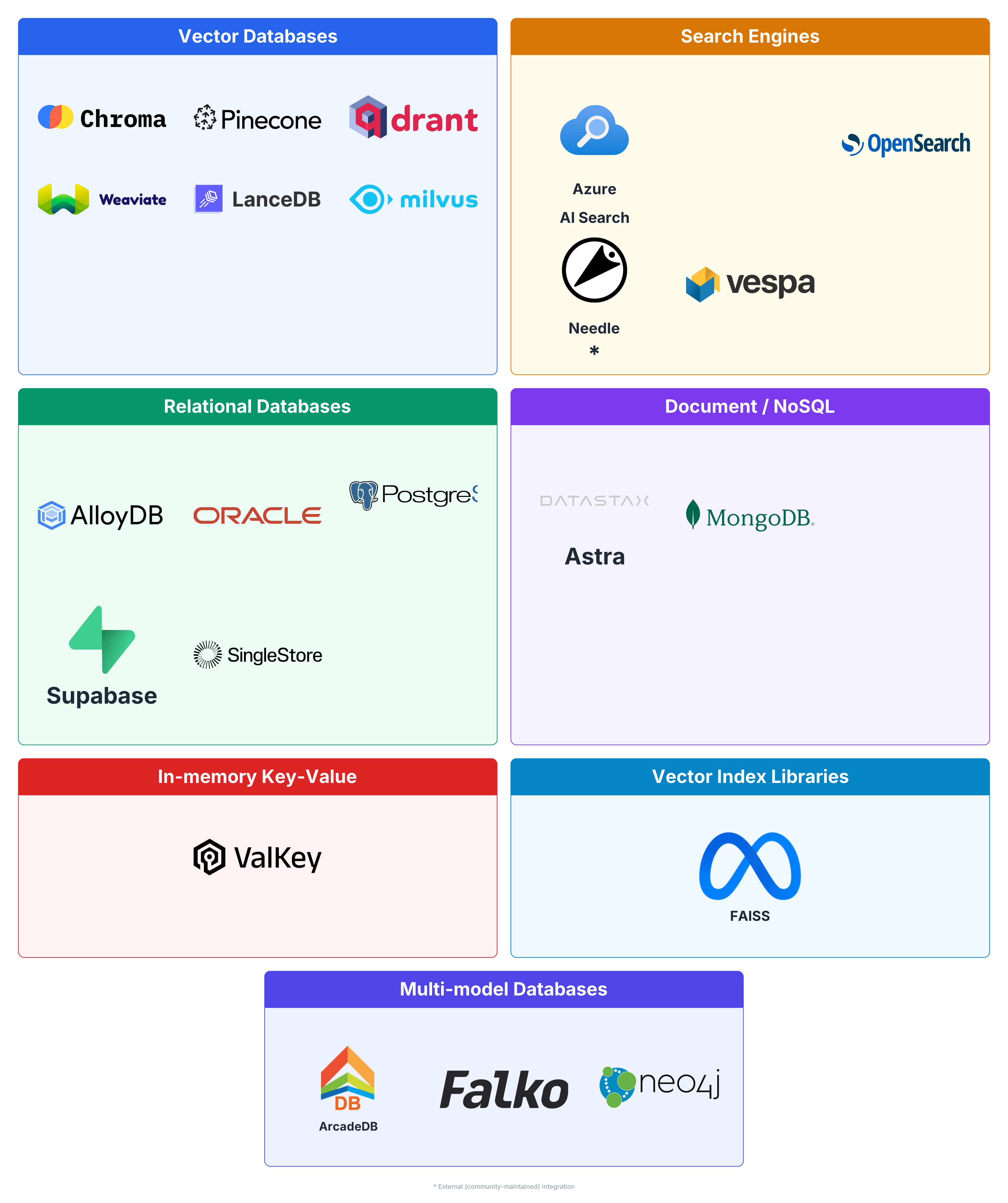
DocumentStore Integrations Available in Haystack
Haystack integrations come in two tiers. Core integrations are built and maintained by the Haystack team — they are tested against every release, follow the same API conventions, and come with full documentation and support. External integrations are contributed and maintained by the community; they extend Haystack's reach but are not covered by the core release cycle.
The tables below list every available integration alongside the key properties you need to choose the right one for your use case: the underlying Engine Type gives you a sense of what the database is optimised for; Open Source tells you whether you can self-host it; Async Support matters for high-throughput pipelines; and Retrievers shows which retrieval strategies are available out of the box — BM25 for keyword search, Embedding for semantic search, Hybrid for both, and specialised options such as Sparse Embedding or SQL where supported.
Core integrations
| Integration | Category | Engine Type | Open Source | Async Support | Retrievers |
|---|---|---|---|---|---|
| ArcadeDB | Multi-model Database | Multi-model database (graph, document, key-value) with HNSW vector search via HTTP/JSON API | Yes | No | Embedding |
| AlloyDB | Relational Database | Managed PostgreSQL-compatible database (Google Cloud) with pgvector extension | No | Yes | Embedding, Keyword |
| Astra | Document / NoSQL Database | Cloud-native managed NoSQL (Apache Cassandra-based) with vector search via DataStax JSON API | No | No | Embedding |
| Azure AI Search | Search Engine | Managed cloud search service (Microsoft Azure AI Search) with HNSW vector search | No | No | BM25, Embedding, Hybrid |
| Chroma | Vector Database | Purpose-built vector database | Yes | Yes | Embedding |
| Elasticsearch | Search Engine | Distributed search & analytics engine with BM25 + vector (kNN) search | Partial | Yes | BM25, Embedding, SQL |
| FAISS | Vector Index Library | In-memory vector similarity search library (Meta/Facebook) with JSON file for metadata | Yes | No | Embedding |
| FalkorDB | Graph Database | OpenCypher graph database with ANN vector search | Yes (SSPL) | No | Embedding, Cypher |
| MongoDB Atlas | Document / NoSQL Database | Cloud document database with Atlas Vector Search and full-text search | No | Yes | Embedding, Full-text |
| Oracle | Relational Database | Oracle with native AI Vector Search, HNSW vector index and DBMS_SEARCH full-text keyword index | No | Yes | Embedding, Keyword |
| OpenSearch | Search Engine | Distributed search engine (AWS fork of Elasticsearch) with BM25 + kNN vector search | Yes | Yes | BM25, Embedding, Hybrid, Metadata, SQL |
| PGVector | Relational Database | Relational database (PostgreSQL) with the pgvector extension for vector similarity search | Yes | Yes | Embedding, Keyword |
| Pinecone | Vector Database | Managed cloud vector database | No | Yes | Embedding |
| Qdrant | Vector Database | Purpose-built vector database with dense + sparse embedding support | Yes | Yes | Embedding, Sparse Embedding, Hybrid |
| Supabase | Relational Database | Managed cloud Supabase — a wrapper over PgvectorDocumentStore with Supabase-specific defaults | Yes | Yes | Embedding, Keyword |
| Valkey | In-memory Key-Value Store | In-memory key-value store (Redis fork) with HNSW vector search via glide client | Yes | Yes | Embedding |
| Vespa | Search Engine | Distributed search & serving engine with BM25 lexical + HNSW vector (ANN) search | Yes | No | BM25, Embedding |
| Weaviate | Vector Database | Purpose-built vector database with hybrid search support | Yes | Yes | BM25, Embedding, Hybrid |
External integrations
| Integration | Category | Engine Type | Open Source | Async Support | Retrievers |
|---|---|---|---|---|---|
| Couchbase | Document / NoSQL Database | Distributed NoSQL document database with vector search via Search Service | Partial | Yes | Embedding, Full-text |
| LanceDB | Vector Database | Embedded vector database built on the Lance columnar format, optimized for multimodal data | Yes | Yes | Embedding, Full-text, Hybrid |
| Milvus | Vector Database | Open-source vector database built for scalable similarity search | Yes | No | Embedding |
| Needle | Search Engine | Managed RAG-as-a-service platform with built-in document storage and vector search | No | Yes | Embedding, Sparse Embedding, Hybrid |
| Neo4j | Multi-model Database | Graph database with native vector index support for combined graph traversal and similarity search | Partial | No | Embedding |
| SingleStore | Relational Database | Distributed SQL database with native vector search and full-text search support | No | Yes | Embedding, Full-text, Keyword |
Vector Databases
- Purpose-built for vector and embedding search
- Advanced indexing techniques for efficient similarity search
- Designed for high scalability and availability with large volumes of high-dimensional data
- Most support metadata filtering alongside vector search
- Increasingly adding hybrid (vector + keyword) search support
- Mostly open source, widely available as managed cloud services
Best for semantic search over large document corpora — e.g. a knowledge base where users search by meaning rather than exact keywords.
Search Engines
- Originally built for full-text (BM25) search, with vector (kNN) capabilities added later
- Excellent support for text data, tokenisation, and language-aware querying
- Scale both horizontally and vertically in production environments
- Strong foundation for hybrid search combining keyword and semantic retrieval
- Battle-tested in enterprise environments with mature tooling and observability
Best for enterprise search or log analytics where both full-text (BM25) and vector search are needed — e.g. an e-commerce product search with filters.
- Azure AI Search (AzureAISearchDocumentStore)
- Elasticsearch
- OpenSearch
- Needle (external integration)
- Vespa
Relational Databases
- Standard SQL databases extended with vector search via plugins or extensions
- Vectors live alongside relational data, enabling combined vector + SQL queries in a single store
- Lower operational overhead when PostgreSQL is already part of the stack
- Vector search performance is lower than purpose-built databases, but sufficient for many use cases
- Familiar tooling, transactions, and data integrity guarantees of a relational database
Best for use cases where documents live alongside structured relational data — e.g. a product catalogue where vector search and SQL JOINs are both needed.
- AlloyDB
- Oracle
- PGVector
- Supabase
- SingleStore (external integration)
Document / NoSQL Databases
- General-purpose document stores with vector search added on top
- Flexible, schema-less data model suited for heterogeneous document collections
- Horizontal scaling and high availability inherited from the underlying NoSQL engine
- Good choice when the database is already in use and adding a separate vector store is undesirable
- Vector search performance may trail behind purpose-built databases
Best for applications already using MongoDB or Cassandra that want to add RAG capabilities without introducing a new infrastructure component.
- Astra (AstraDocumentStore)
- MongoDB Atlas
- Couchbase (external integration)
In-memory Key-Value Stores
- In-memory architecture delivers extremely low read/write latency
- Vector search (HNSW) layered on top of an existing caching infrastructure
- Ideal when the stack already includes Redis or Valkey as a cache or session store
- Data is ephemeral by default; persistence requires explicit configuration
- Less suited for large corpora where memory cost becomes significant
Best for low-latency, real-time retrieval — e.g. a chatbot that needs sub-millisecond response times.
Vector Index Libraries
- Low-level, in-process vector similarity search — not a full database
- No network overhead; runs entirely within the application process
- Very efficient use of hardware resources (CPU/GPU)
- Limited to vectors only; metadata must be managed separately (e.g. via a JSON file)
- No built-in persistence, replication, or multi-client access
Best for local prototyping, research, or small-scale applications where a lightweight in-process solution is preferred over running an external database server.
Multi-model Databases
- Single engine supporting multiple data models: graph, document, key-value, and vector
- Eliminates the need to maintain separate databases for different data representations
- Suited for knowledge graphs or applications with complex entity relationships
- Vector search (HNSW) available alongside graph traversal and document queries
- Smaller community and ecosystem compared to more established categories
Best for applications requiring multiple data models in a single engine — e.g. a knowledge graph where entities are connected by relationships and also need vector similarity search.
The In-memory Document Store
Haystack ships with an ephemeral document store that relies on pure Python data structures stored in memory, so it doesn't fall into any of the vector database categories above. This special Document Store is ideal for creating quick prototypes with small datasets. It doesn't require any special setup, and it can be used right away without installing additional dependencies.
Final Considerations
It can be very challenging to pick one vector database over another by only looking at pure performance, as even the slightest difference in the benchmark can produce a different leaderboard (for example, some benchmarks test the cloud services while others work on a reference machine). Thinking about including features like filtering or not can bring in a whole new set of complexities that make the comparison even harder.
What's important for you to know is that the Document Store interface doesn't add much to the costs, and the relative performance of one vector database over another should stay the same when used within Haystack pipelines.